Mobile Ziplock Screen Lock App: A Creative Way to Protect Your Phone
Smartphones contain private photos, messages, documents, apps, and other personal information. A strong screen lock is therefore an important part of everyday mobile security. If you are looking for a creative alternative to the traditional PIN, pattern, or fingerprint lock, a Mobile Ziplock Screen Lock App can provide an interesting way to customize your phone’s lock screen.
What Is a Mobile Ziplock Screen Lock App?
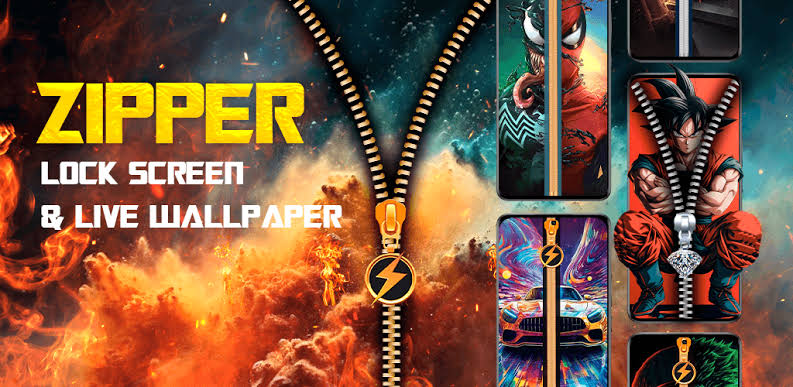
A mobile ziplock screen lock app is an Android customization application that gives your lock screen a zipper-style design. Instead of simply displaying a standard password screen, the app can create a visual zipper that users interact with to unlock the device.
Depending on the application, you may be able to customize the zipper style, background image, colors, animations, and other visual elements. This makes the lock screen look more personalized while maintaining the familiar purpose of restricting access to the device.
How Does a Ziplock Screen Work?
The basic idea is simple. After installing a compatible application, you can configure its lock-screen design and choose the available security options. When the phone is locked, a zipper animation or similar visual effect appears on the screen.
Some apps allow users to swipe or drag the zipper to reveal the unlock interface. Others combine the zipper animation with a PIN, pattern, or another security method. The exact features depend on the particular app and Android version.
It is important to remember that a visual zipper effect is not automatically a stronger security method. If privacy is your priority, use a reliable PIN, password, fingerprint, or the security system provided by your phone.
Main Features
A typical Mobile Ziplock Screen Lock App may offer several customization features:
- Zipper-style animation: Creates an attractive unlocking effect.
- Custom wallpapers: Use your own photo or select a built-in background.
- Different zipper designs: Choose from multiple styles, colors, and themes.
- Sound and vibration: Some apps provide optional effects during unlocking.
- Clock and date: Display basic information on the lock screen.
- PIN or pattern support: Some applications can work alongside conventional security methods.
- Easy customization: Settings can usually be changed without complicated configuration.
Because apps vary considerably, check their current feature list and permissions before installing one.
How to Set Up a Ziplock Lock Screen
First, download a reputable ziplock screen-lock application from a trusted source. Install it and review the permissions it requests. Open the application and select your preferred zipper theme or wallpaper.
Next, customize the available options, such as animation, sound, clock style, and background. If the app supports an additional PIN or pattern, configure that security method as well. Finally, activate the lock-screen feature and test it several times.
Keep your phone’s original Android screen-lock security enabled whenever possible. Avoid applications that require unnecessary permissions or ask for sensitive information unrelated to their purpose.
Security and Privacy Considerations
Third-party lock-screen applications can require permissions such as displaying over other apps, accessibility access, notifications, or device-management features. These permissions can be powerful, so users should understand why an app needs them before granting access.
Download
A decorative zipper lock should not be considered a replacement for your phone’s built-in security. For stronger protection, use a unique PIN or password and enable fingerprint or facial authentication when supported by your device.
Conclusion
A Mobile Ziplock Screen Lock App can make an ordinary Android lock screen more attractive and personalized. With zipper animations, custom wallpapers, themes, and optional sounds, it offers a fun alternative to a standard lock-screen appearance.
However, appearance and security are two different things. Choose applications carefully, review their permissions, and keep your phone’s built-in security features enabled. With the right combination of customization and genuine device security, you can create a lock screen that looks unique while helping protect your personal information.